
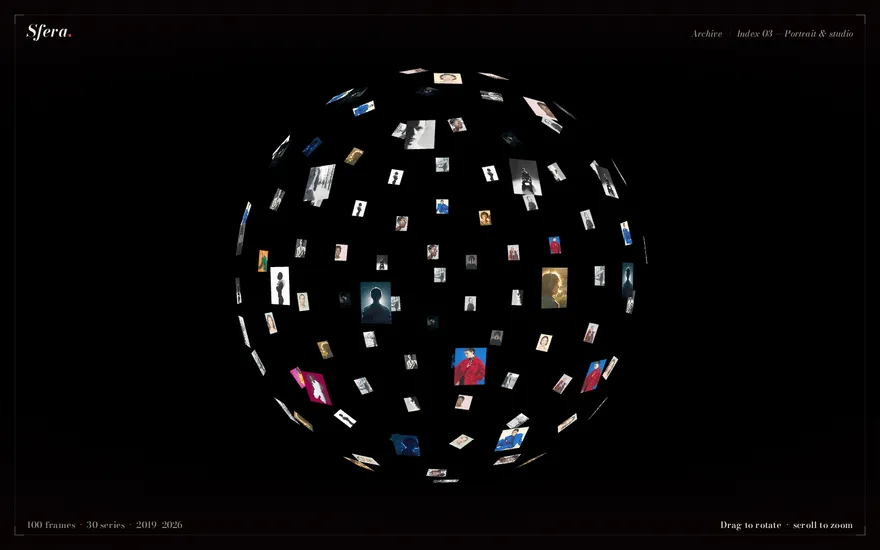
Looping preview · motionprompts.dev
The build prompt
From motionprompts.dev18,053 chars
# Asset Orb — Draggable WebGL Image Sphere

## Goal
Build a full-viewport, pitch-black WebGL scene containing a single **"orb" made of 100 small photo planes** arranged on the surface of a sphere via a **Fibonacci-sphere (golden-spiral) distribution**, every plane textured with one of 30 editorial photographs picked at random. The user **drags to spin the orb** (with damped inertia, so it keeps gliding after release) and **scrolls/pinches to zoom** between a near and far limit. A fixed HTML nav ("ORB") and footer ("[ ARCHIVE BEYOND REALITY ]") float over the canvas. This is a pure Three.js piece — **no GSAP at all**; all motion comes from OrbitControls damping inside a `requestAnimationFrame` loop.

## Tech
Vanilla HTML/CSS/JS with ES module imports. Use **`three` (npm) only** — no GSAP, no Lenis, no other libraries. Import:
```js
import * as THREE from "three";
import { OrbitControls } from "three/addons/controls/OrbitControls.js";
```

## Layout / HTML
Nearly empty — the canvas is injected by JS:
```html
<body>
  <div class="container"></div>
  <nav><h1>Orb</h1></nav>
  <footer><p>[ Archive beyond reality ]</p></footer>
  <script type="module" src="./script.js"></script>
</body>
```
JS appends the WebGL `<canvas>` (`renderer.domElement`) into `.container`.

## Styling
Minimal — the canvas is the whole show.
- Global reset `* { margin: 0; padding: 0; box-sizing: border-box; }`.
- `.container { width: 100vw; height: 100vh; overflow: hidden; }` — hosts the canvas.
- `nav, footer { position: fixed; width: 100vw; display: flex; justify-content: center; align-items: center; padding: 3em; z-index: 2; }` — both are centered overlay strips above the canvas. `nav { top: 0 }`, `footer { bottom: 0 }`.
- `h1 { text-transform: uppercase; font-family: "Gojo", sans-serif; font-size: 18px; font-weight: 900; color: #fff; }` — a heavy display sans; no webfont needed, the bold sans fallback is fine.
- `p { text-transform: uppercase; font-family: "Akkurat Mono", monospace; font-size: 11px; color: #777777; }` — small grey mono caption (again, the monospace fallback is fine).
- Background is not set in CSS — the black comes from the renderer clear color.

## Three.js effect (the important part — be exhaustive)

### Config constants
```js
const totalImages  = 30;   // pool of photo files
const totalItems   = 100;  // planes on the sphere
const baseWidth    = 1;    // max plane width  (world units)
const baseHeight   = 0.6;  // max plane height (world units)
const sphereRadius = 5;
```

### Scene / camera / renderer
- `scene = new THREE.Scene()` — no lights needed (materials are unlit `MeshBasicMaterial`).
- `camera = new THREE.PerspectiveCamera(75, innerWidth / innerHeight, 0.1, 1000)`, positioned at `camera.position.z = 10` (so the whole radius-5 orb fits comfortably in frame).
- Renderer:
```js
const renderer = new THREE.WebGLRenderer({
  antialias: true,
  alpha: true,
  preserveDrawingBuffer: true,
  powerPreference: "high-performance",
});
renderer.setSize(window.innerWidth, window.innerHeight);
renderer.setClearColor(0x000000);           // the solid black backdrop
renderer.setPixelRatio(window.devicePixelRatio);
document.querySelector(".container").appendChild(renderer.domElement);
```
No tone mapping / color-space tweaks are required — defaults are fine.

### OrbitControls (the interaction — this IS the "animation")
```js
const controls = new OrbitControls(camera, renderer.domElement);
controls.enableDamping = true;   // inertia: the orb keeps drifting after the drag ends
controls.dampingFactor = 0.05;   // long, floaty glide
controls.rotateSpeed   = 1.2;    // slightly faster-than-default drag response
controls.minDistance   = 6;      // zoom-in limit (just outside the radius-5 shell)
controls.maxDistance   = 10;     // zoom-out limit (= initial camera distance)
controls.enableZoom    = true;   // wheel / pinch zooms the dolly distance
controls.enablePan     = false;  // no panning — the orb stays centered
```
Damping only works because `controls.update()` is called **every frame** in the render loop.

### Fibonacci-sphere distribution (exact math)
100 points evenly spread over the sphere surface using the golden-spiral method. For `i` from `0` to `totalItems - 1`:
```js
const phi   = Math.acos(-1 + (2 * i) / totalItems);   // polar angle: pole → pole
const theta = Math.sqrt(totalItems * Math.PI) * phi;  // winding azimuth
```
Then convert to Cartesian on the radius-5 shell (note this exact axis mapping):
```js
mesh.position.x = sphereRadius * Math.cos(theta) * Math.sin(phi);
mesh.position.y = sphereRadius * Math.sin(theta) * Math.sin(phi);
mesh.position.z = sphereRadius * Math.cos(phi);
```

### Texture loading & plane creation (one mesh per point)
For each of the 100 points, load a **random** image from the pool with a shared `THREE.TextureLoader`:
```js
const n = Math.floor(Math.random() * totalImages) + 1;  // 1..30, duplicates allowed
// path e.g. `./img${n}.jpeg` — point at wherever the 30 files live
```
In the load callback:
- Texture filtering: `texture.generateMipmaps = false; texture.minFilter = THREE.LinearFilter; texture.magFilter = THREE.LinearFilter;` (crisp, no mip blur on the small planes).
- **Aspect-fit plane geometry** inside the 1 × 0.6 box — never crop, shrink one side instead:
```js
const aspect = texture.image.width / texture.image.height;
let width = baseWidth, height = baseHeight;
if (aspect > 1) height = width / aspect;   // landscape: full 1.0 wide, shorter
else            width  = height * aspect;  // portrait/square: full 0.6 tall, narrower
const geometry = new THREE.PlaneGeometry(width, height);
```
- Material — unlit, double-sided (so planes on the far side of the orb are visible through the gaps, which gives the see-through "hollow shell of photos" look):
```js
const material = new THREE.MeshBasicMaterial({
  map: texture,
  side: THREE.DoubleSide,
  transparent: false,
  depthWrite: true,
  depthTest: true,
});
```
- Orientation — every plane faces **outward** from the center:
```js
mesh.lookAt(0, 0, 0);
mesh.rotateY(Math.PI);  // lookAt points the front face inward; flip it back out
```
- `scene.add(mesh)`.

### Deferred start of the render loop
Keep a `loadedCount`; increment it in each texture callback and only start animating **after all 100 textures have loaded**:
```js
loadedCount++;
if (loadedCount === totalItems) animate();
```
So the page shows plain black (with the nav/footer text) for a moment, then the fully-populated orb pops in at once — there is no progressive build-up. Log texture errors with the loader's `onError` callback.

### Render loop
```js
const animate = () => {
  requestAnimationFrame(animate);
  controls.update();              // applies damping/inertia every frame
  renderer.render(scene, camera);
};
```
No autonomous rotation — the orb is perfectly still until the user drags it.

### Resize handler
On `window.resize`: `renderer.setSize(w, h)`, `camera.aspect = w / h`, `camera.updateProjectionMatrix()`.

## Assets / images
**30 editorial fashion / portrait photographs** (`img1.jpeg` … `img30.jpeg`), mixed orientations (portraits, profile shots, full-length figures, extreme close-ups), with a moody, cinematic, high-fashion palette — saturated reds, deep teals and blues, black-and-white shots, dark backdrops — so the tiles glow against the black void. They are interchangeable: each of the 100 planes picks one at random (repeats are expected and fine). Mixed aspect ratios are actually desirable — the aspect-fit sizing turns them into varied landscape/portrait tiles, which gives the orb its collage texture. If fewer files are available, reduce `totalImages` accordingly and repeat.

## Behavior notes
- **Interaction only** — nothing animates on load; drag rotates (in any direction, full 360° including over the poles), release keeps a damped spin, wheel/pinch zooms between distance 6 and 10. No pan.
- The orb is **hollow and see-through**: through the gaps between front planes you see the mirrored backs of the far-side planes (`DoubleSide` shows the texture mirrored on the reverse — correct and intentional).
- Full-viewport canvas, responsive via the resize handler; interaction works with touch as well (OrbitControls handles pointer + touch), though the piece is desktop-oriented and WebGL-heavy (100 textured meshes).
- No GSAP, no ScrollTrigger, no scroll hijacking — the page itself never scrolls; the wheel is captured by OrbitControls for zoom.
- No reduced-motion handling in the original (all motion is user-driven anyway).

## Images

This component ships with 30 reference assets, served publicly.
Use them as-is to reproduce the demo faithfully, then swap in your own — the layout expects the
same aspect ratios.

```
https://motionprompts.dev/c/asset-orb-js/img1.jpeg
https://motionprompts.dev/c/asset-orb-js/img10.jpeg
https://motionprompts.dev/c/asset-orb-js/img11.jpeg
https://motionprompts.dev/c/asset-orb-js/img12.jpeg
https://motionprompts.dev/c/asset-orb-js/img13.jpeg
https://motionprompts.dev/c/asset-orb-js/img14.jpeg
… 24 more under https://motionprompts.dev/c/asset-orb-js/
```

They are hotlinkable for prototyping. For anything you ship, replace them: they are licensed for
demonstration of this component, not for redistribution.

## Using this outside its demo page

This component is written as a complete page — that is how the demo is meant to look. If you are dropping it into an existing project, or combining it with other components, these are the things it declares at document level and that you need to move or reconcile first.

- **Palette on `:root`** — `--ink`, `--ink-dim`, `--signal`, `--bg`, `--serif`. These names are not namespaced and they collide: `--ink` is defined by 164 of the 219 components in this catalogue, `--paper` by 94, `--muted` by 80, each with different values — and they will also collide with whatever your own project defines. Move them onto the component's wrapper (`.my-section { --ink: … }`) or rename them with a prefix.
- **Rules on `*`, `body`** — the demo owns the whole document, so these set the page background, typography and resets. Dropped into an existing project they restyle the entire page, not just this section. Re-target them at the component's wrapper before using it.
- **Full-screen overlay** — a fixed element covers the viewport (a loader or transition). Only one may exist per page and it must remove itself when done. If your page already has one, keep that and drop this; otherwise the second silently hides the first.

## Adapting this to React

Everything above describes a standalone module that runs once, at import time, and never expects
a second copy of itself to exist: it builds the scene, camera, renderer and `OrbitControls` as
soon as the file parses, fires off a hundred texture loads, and starts the render loop only once
the last of those loads has resolved. React withdraws that guarantee, and the fault line here runs
straight through the parts that talk to the GPU and the parts that talk to the network: the
`WebGLRenderer`, the hundred `TextureLoader` callbacks racing to populate the sphere,
`OrbitControls`'s own pointer/wheel/touch listeners on `renderer.domElement`, and the
`requestAnimationFrame` loop that only starts once `loadedCount` reaches `totalItems`.

Under React 19 with StrictMode, every effect mounts, unmounts, and mounts again before anything
reaches the screen. A StrictMode unmount that lands while some of the hundred textures are still
in flight leaves their callbacks live; each one that resolves afterward will happily call
`scene.add(mesh)` on a scene nobody is rendering anymore, or — if the second mount's
`createSphere()` has already started its own hundred loads into a second scene — nudge a stale
`loadedCount` toward `totalItems` and either start a render loop for a component that no longer
exists, or never start one at all because the count is now split across two closures. The visible
symptom is an orb that never appears, or two canvases stacked in the same container, and none of
it reproduces in a production build, because only development does the double mount.

*(1) The entry point* — The whole file executes the moment the module is evaluated: `scene`,
`camera`, `renderer` and `controls` are constructed, `renderer.domElement` is appended, and
`createSphere()` is called, all before the browser is guaranteed to have laid out anything else on
the page. In React that moment is import time, before the component holding the container div has
even rendered — `document.querySelector(".container")` runs against a DOM that does not have that
container yet, and `appendChild` throws on `null`. Move the entire body — scene/camera/renderer/
controls construction, the sphere-population loop, and the `resize` listener — into a `useEffect`
with an empty dependency array. Do not leave any of it at module or component-body scope: a fresh
`PerspectiveCamera` and a hundred new texture loads on every render is exactly what happens if this
stays outside the effect.

*(2) Element lookups* — `document.querySelector(".container")` assumes this script owns the whole
document and that there is exactly one `.container` in it. Give the component a root `ref`, render
the div that plays `.container`'s role under that ref, and append `renderer.domElement` into
`ref.current` directly instead of resolving it by class name. During the StrictMode remount two
`.container` divs exist for an instant, and a class-name lookup binds to whichever one the DOM
happens to return first — not necessarily the copy that is staying mounted.

*(3) Cleanup — the async texture loads, the deferred rAF loop, and `OrbitControls`* — Nothing here
is cheap to leave running. Give the effect a `cancelled` flag: each of the hundred
`textureLoader.load` callbacks should check it before calling `scene.add(mesh)` or incrementing the
loaded count, so a texture that resolves after unmount neither populates a scene nobody owns nor
nudges a stale counter toward starting a render loop for a component that is gone. Keep
`loadedCount` and the id `animate`'s first `requestAnimationFrame` call returns as variables local
to this effect's own closure, not module-level state, or a remounted copy inherits — or races —
the previous mount's count. Once `animate` does start, call `cancelAnimationFrame` on that id in
the cleanup; this loop only starts after all hundred textures resolve, so the mount that starts it
and the mount that has to cancel it can end up being two different mounts if the timing lands
badly. `OrbitControls` binds its own pointer, wheel and touch listeners to `renderer.domElement`
inside its constructor; call `controls.dispose()` in the cleanup, or a remounted copy leaves a
first set of listeners still spinning a camera nobody can see. Finally, walk the hundred meshes and
dispose their geometry, their material, and the texture each material holds, then call
`renderer.dispose()` and `renderer.forceContextLoss()` before removing `renderer.domElement` from
the container — none of that is garbage-collected on its own, and skipping `forceContextLoss()` is
the failure that only shows up once a user has revisited this route enough times in one session to
exhaust the browser's WebGL context budget. Remove the `window` `resize` listener the same way.

*(4) Rendering this in `@react-three/fiber`* — `<Canvas>` replaces the hand-built
`WebGLRenderer`/`Scene`/`PerspectiveCamera` block, and drei's `<OrbitControls>` (with damping,
rotate speed, and the near/far distance limits carried over as props) replaces both the manual
`new OrbitControls(camera, renderer.domElement)` call and its disposal — drei drives the damping
update from its own internal per-frame subscription, so nothing here needs a hand-written
`useFrame` just to keep the inertia alive, and there is no reason to start a `requestAnimationFrame`
loop of your own inside the `<Canvas>` for it: that would just be a second clock fighting the first
over the same camera. The hundred-point Fibonacci-sphere layout is a pure function of the point
index and the total count, so compute the array of positions once with `useMemo` and render it with
`.map()` into one `<mesh>` per point, rather than the imperative `for` loop building meshes by
hand. Each mesh's texture is one random pick from the pool of thirty images; the declarative
equivalent of `textureLoader.load` is drei's `useTexture(path)`, called once per mesh — and because
`useTexture` is Suspense-driven, wrapping the whole group of a hundred meshes in a single
`<Suspense fallback={null}>` reproduces the `loadedCount === totalItems` gate for free: React only
commits the group once every texture inside it has resolved, so the orb still pops in fully built,
with nothing partially assembled visible in between. Resize handling is already done by `<Canvas>`
observing its container, so the manual `resize` listener and the `setSize` call both go away.

The "static poster" rule that applies to heavier three-family slugs in this catalogue is already
satisfied by this component's own design: there is no partially-built orb to hide behind an image,
because the effect is deliberately all-or-nothing — plain black canvas, then every plane appearing
at once. The `Suspense fallback={null}` above is that poster; there is no separate image to swap
in, just make sure the canvas's own black clear color is what shows through while the group is
suspended, not an unstyled white rectangle underneath it.

Every material on this orb is an unlit `MeshBasicMaterial` sampling a photo texture — there are no
lights anywhere in the scene and nothing reads an environment map, so drei's `Environment` does not
come up here architecturally. If a later variant of this piece adds lit geometry around the orb —
a frame, a pedestal — resist reaching for `Environment preset`: it fetches its HDRI from a
third-party CDN hard-coded into drei, and the scene goes unlit the moment that host is unreachable.
Light it with explicit lights, or self-host an HDRI and point `Environment` at your own file.More like this
 00:32
00:32Showreel with Blender 3D and self-made soundtrack
Three.jsOpus 5.5
1 00:35
00:35Interactive 3D Raptor 3 Rocket Engine WebGL Model
Three.jsOpus 5.5
1 00:18
00:18Mobile game reward animation template
Three.jsOpus 5.5
1 00:15
00:15Mobile Game Reward Reveal Animation
Three.jsOpus 5.5
1 00:08
00:081906 San Francisco Market Street in Blender
Three.jsOpus 5.5
1 01:20
01:20Glass and gold mosaic that comes alive
Three.jsOpus 5.5
1